The whole week on one board, where the whole house can see it.
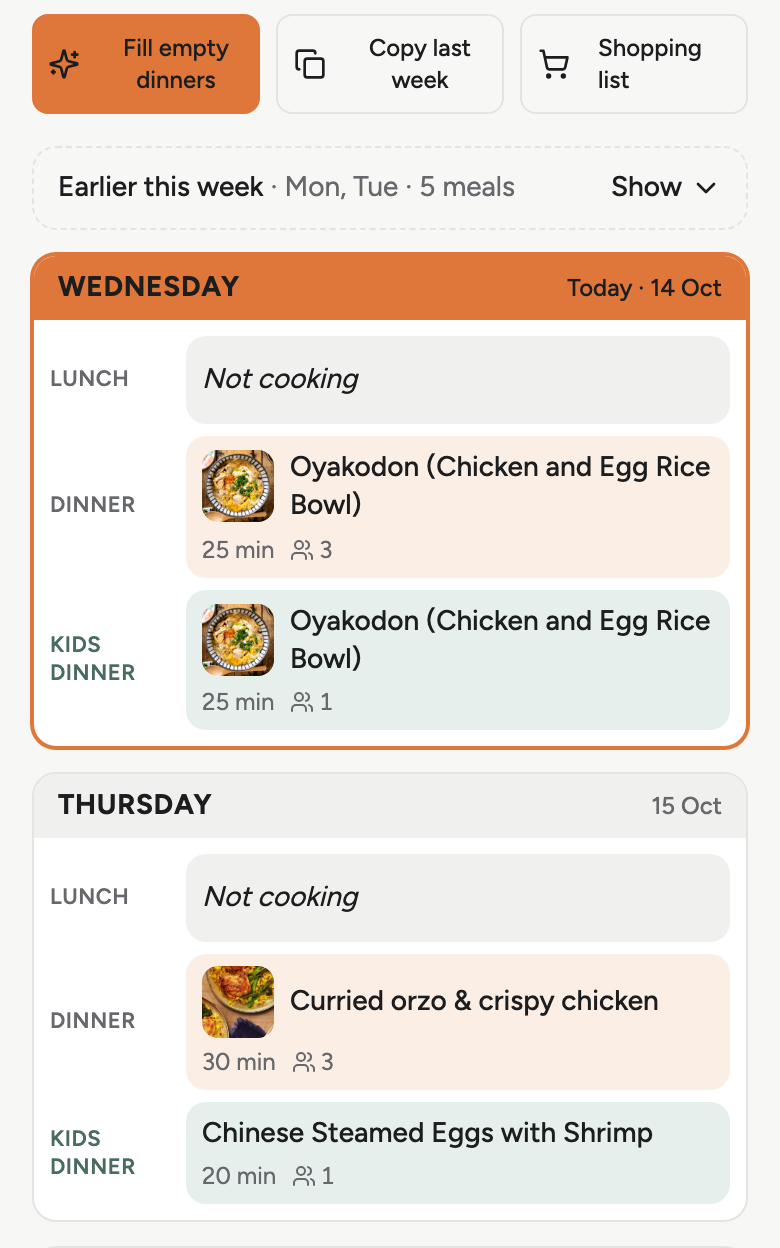
Lunches and dinners for seven days, the kids’ meals on their own line, Not cooking and Leftovers in one tap. Whoever is cooking opens tonight on their own phone or on the fridge.
What it does today
The week on one board
Lunches and dinners, Monday to Sunday. A meal can hold several dishes, rice and two dishes on one line, and a dish without a recipe is just its name.
The kids’ line
Turn it on for the nights they eat earlier or something else, with its own portions. The notes box holds the rules everyone should know.
Not cooking, Leftovers
One tap each. The night stays on the board and leaves the shopping list, so nobody shops for a dinner that is not happening.
Fill empty dinners
Suggestions from your own recipes for the nights still blank, favouring the ones you have not had lately. Or copy last week and change two nights.
Everyone sees the same board
One invite link. Your partner, the helper or the grandparents open it on their own phone, and a change shows for everyone.
The fridge view
A spare tablet on the fridge shows the week in large type with today marked. Tapping a meal opens the recipe scaled to the portions you planned, with a code to open it on a phone.
Before you ask
Does the helper need to set anything up?
One invite link. They sign in once on their own phone and see the same board as you.
We eat out and order in. Does that break it?
Mark the night Not cooking or Leftovers. It stays on the board and leaves the shopping list.
Does it count calories or score the week?
No. It shows the week and leaves the judgement to you. Some recipes carry calories from their source.
Where this is going
Not built yet. One tap tells us which to build first.
A screen for the fridge
A paper-like display on the fridge door that shows the week and updates itself.
A phone app
Kitchen Stock as an app, with a nudge when the plan changes.
Who does what
Who shops, who cooks, who can change the plan, set per person.
A starter week
A first week filled for a new household from a few questions, to change rather than to write.
The five things it does
Plan next week tonight.
Set up the household, save a few recipes you already cook and fill the board. Invite the others once it looks right. Ten minutes.
Plan next weekFree while in beta. After that S$6.90 a month for the whole household, and the board and the list stay free.